Published
SEARCH MEASUREMENT / PRACTICAL EXPLAINER
Google Search Console’s AI report: what the numbers mean.
A guide to reading AI impressions, explaining mismatched totals and comparing pages across Japan and English-speaking markets.
THE SHORT ANSWER
Search Console’s generative AI report shows when links to your site appear in supported Google AI features. Read it as evidence of visibility. It does not, by itself, establish a visit, a recommendation or a sale. [1]
01 / WHAT CHANGED
What does Google’s AI report measure?
Google announced dedicated generative AI performance reports on 3 June 2026. The Search version covers AI Overviews and AI Mode; Discover has its own report. Google’s announcement lists impressions, pages, countries, devices for Search, and dates. The underlying data remains included in the overall performance report. [2]
The current Search documentation does not list dedicated clicks, CTR, position or query data. Treat those as reporting limits, not blanks to fill with estimates. It also describes a phased rollout and says insufficient impressions can explain a missing report. An unavailable view is not a measured zero. [1]
GOOGLE’S OFFICIAL SCREEN EXAMPLE
Where the numbers appear
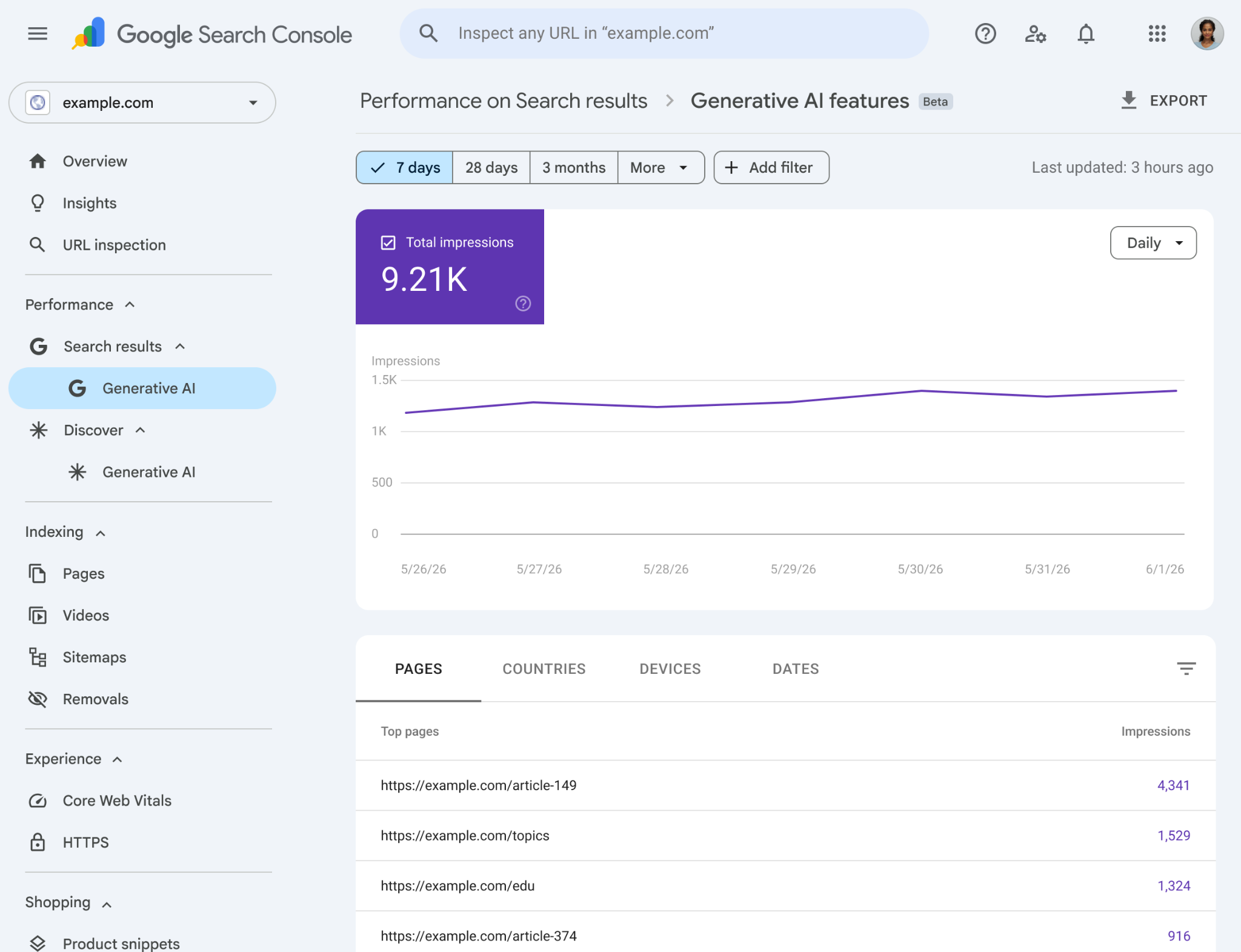
Start with the scope. The sidebar separates the Search and Discover AI reports.
Then check the period. The date filter sits above the impressions card and chart.
Finally, check the grouping. Pages, Countries, Devices and Dates appear below the chart. Selecting a different grouping changes what the table describes.
MEW’s recommendation: decide what question each metric answers before putting it on a dashboard. An impression can help you identify a page to investigate. Whether people reached that page, understood the offer or contacted the business requires other evidence.
Do not add AI impressions to an overall Search total that already contains them. Nor should you call this a measure of visibility across every AI service: the scope here is Google’s supported features, not ChatGPT, Perplexity or the whole answer-engine market. [2]
02 / THE COUNTING RULE
Why can the page table exceed the chart?
They can count different units. Google distinguishes aggregation by property from aggregation by page. Multiple results from one property count once at property level; distinct URLs are counted separately at page level. [3]
MEW / MEASUREMENT NOTE 01
ILLUSTRATIVE EXAMPLEOne appearance.
Two ways to count.
Two distinct pages from the same site appear together in one generative AI result.
COUNT THE PROPERTY
Both links belong to one site.
The property is counted once.
COUNT EACH PAGE
Page A: 1 Page B: 1
Each distinct page is counted.
In the AI report, the unfiltered chart is aggregated by property. Adding a URL filter changes its aggregation to URL level. The table’s aggregation depends on the selected dimension. [1]
Before explaining a discrepancy, record the filters and grouping. A page-total increase might reflect more pages appearing together, rather than more separate appearances for the property. That is an interpretation to investigate, not something the example proves about your site.
Before comparing totals, ask “What did each total count?” Do not force unlike totals to reconcile by deleting rows or changing the period.
03 / JAPAN AND ENGLISH PAGES
Does country data tell you which language works?
No. Google’s country dimension identifies where a search originated. Page reporting generally assigns data to the canonical URL. Neither tells you the language of the page without a separate classification. [4]
MEW’s approach: keep a small URL register with the page’s actual language, intended market and purpose. Match the reported canonical URL to that register. An English page viewed from Japan remains an English page; a Japanese page viewed abroad remains Japanese. Leave ambiguous or unmatched URLs unclassified until checked.
Start with two separate views: which pages appear, and which countries account for visibility. Do not invent a page-by-country breakdown by joining two aggregate exports. Use that combination only when a supported report or filter actually supplies it, and preserve the filter conditions.
Compare similar page purposes, devices and complete periods before changing editorial resources. One newly published Japanese guide and an established English tool page are not a controlled language test. Even a sustained difference would be an observation under those conditions, not proof that translation or a familiar visual style caused it.
04 / A REPORT SOMEONE CAN CHECK
What should an AI visibility report include?
A useful report makes its numbers traceable. Keep the measurement conditions beside the finding rather than burying them in a separate file. The checklist below is MEW’s proposed reporting practice, not a Google-required template.
| Keep with the number | What to record | What it prevents |
|---|---|---|
| Scope | Property, report and supported feature scope | Calling Google visibility “all AI visibility” |
| Counting unit | Property or page; active filters and grouping | Treating page totals as an audience count |
| Market and language | Country filter and a separate URL-language register | Calling Japan traffic Japanese-content performance |
| Time and data status | Period, time zone, retrieval date and preliminary values | Comparing incomplete or incompatible windows |
| Missing values | Original display state alongside the export | Turning unavailable data into a measured zero |
| Business outcome | Visits and qualified enquiries, each from its own source | Presenting visibility as revenue |
There is a practical export trap: Google says values shown as ~ or - can become zeros in downloaded data. Its data guide also describes preliminary values that may change. Preserve the original state before building comparisons or charts. [3]
Use the report to choose what to inspect, then test a specific improvement. If a page appears but buyers cannot verify pricing, support or product fit, more visibility alone does not repair that gap. Our guide to AI discovery and Japanese buyer evidence examines what the destination page needs to establish.
Keep visibility, visits and qualified enquiries separate. A useful next action can connect them; a single score cannot explain them.
05 / SOURCES AND LIMITS
What this explainer is based on
This article interprets Google’s public documentation checked on 27 August 2026. The diagram is an explanation of counting rules, not an experiment or a client result. We have not verified report availability or performance data for MEW’s properties here. Reporting features can change; recheck the source before repeating the workflow.
- Google Search Console Help: Generative AI performance report (Search)
- Google Search Central: Introducing Search Generative AI performance reports · 3 June 2026
- Google Search Console Help: About the data
- Google Search Console Help: Dimensions and data groupings
For our approach to sources and limitations, read the MEW methodology.